Robotics Replay Showcase
The real robotics showcase is WorldForge's primary end-to-end physical-AI demo. It combines a Hugging Face LeRobot policy with a LeWorldModel cost-model checkpoint, then uses WorldForge's policy-plus-score planner to select and mock-replay the best action chunk.
No hardware is controlled by this command. It demonstrates policy inference, score-model inference, candidate ranking, provider events, and local replay; robot controllers, safety checks, and task-specific preprocessing remain host-owned.
The default task is PushT. The default policy is lerobot/diffusion_pusht. The default
LeWorldModel checkpoint is ~/.stable-wm/pusht/lewm_object.ckpt.
For the implementation-level contract, tensor shapes, provider sequence, and real-robot mapping, see Robotics Showcase Technical Deep Dive.
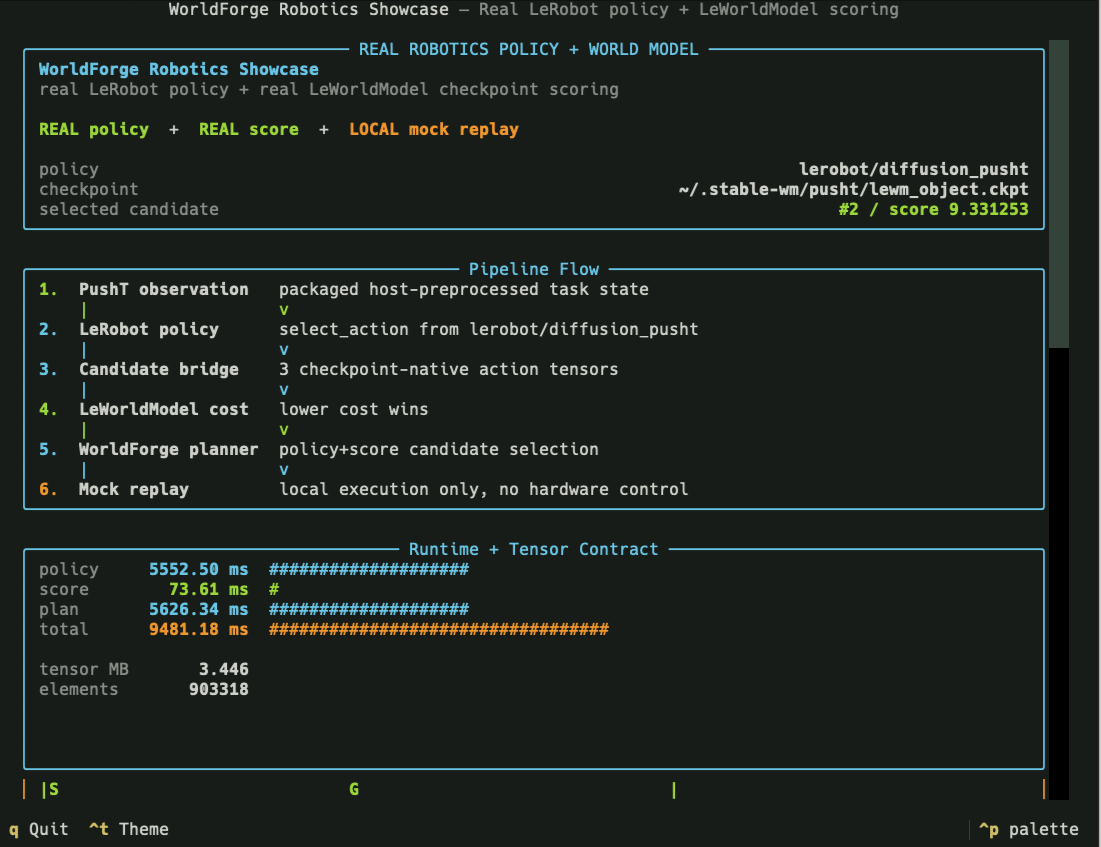
Pipeline: real LeRobot policy, real LeWorldModel checkpoint scoring, WorldForge planning, local mock replay. |
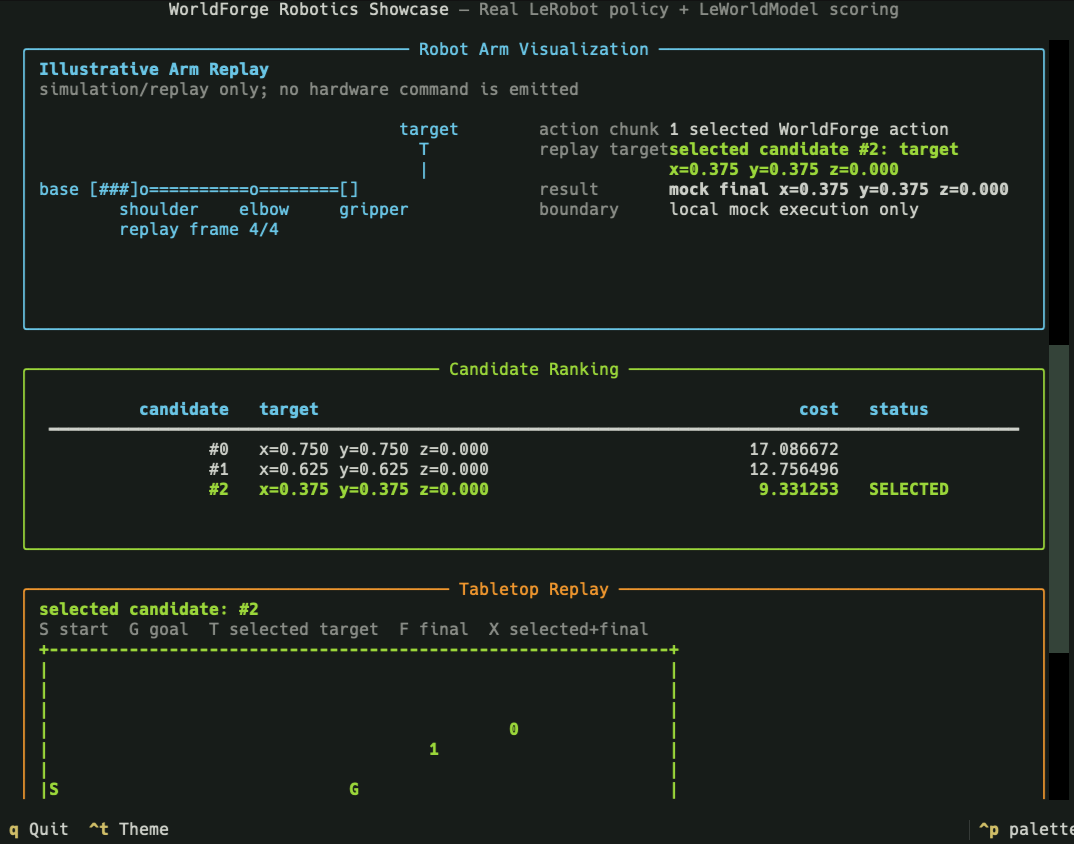
Decision: selected candidate, cost landscape, provider events, and tabletop replay. |
Run It
Use the one-command showcase entrypoint:
By default, the script:
- launches an ephemeral Python 3.13
uvruntime with host-owned optional dependencies; - requests
lerobot[transformers-dep]==0.5.1so the Python 3.13 policy import path is stable while the LeWorldModel runtime is also installed; - runs real LeRobot policy inference and real LeWorldModel checkpoint scoring;
- opens a staged Textual report with the pipeline trace, metric bars, tensor contract, candidate ranking, provider event log, robot-arm illustration, tabletop replay, and Rerun open shortcut;
- writes a JSON summary to
/tmp/worldforge-robotics-showcase/real-run.json; - writes a visual Rerun recording to
/tmp/worldforge-robotics-showcase/real-run.rrd; - writes TensorBoard
tfeventslogs under.worldforge/tensorboard/for LeWorldModel checkpoint inspection (provenance, score distribution, latency, provider events).
Useful flags:
scripts/robotics-showcase --health-only       # non-mutating dependency/checkpoint preflight
scripts/robotics-showcase --no-tui            # plain terminal report
scripts/robotics-showcase --json-only         # machine-readable summary only
scripts/robotics-showcase --no-rerun          # skip the default Rerun .rrd artifact
scripts/robotics-showcase --rerun-output /tmp/pusht.rrd
scripts/robotics-showcase --no-tensorboard    # skip the default TensorBoard tfevents
scripts/robotics-showcase --tensorboard-logdir .worldforge/tensorboard/pusht
scripts/robotics-showcase --tui-stage-delay 0.1
scripts/robotics-showcase --no-tui-animation
scripts/robotics-showcase --lewm-asset-cache-dir ~/.cache/worldforge/leworldmodel
scripts/robotics-showcase --lewm-revision 22b330c28c27ead4bfd1888615af1340e3fe9052
Open the Rerun artifact from the TUI with o, or from the shell with:
Open the TensorBoard logs from the TUI with t, or from the shell with:
See TensorBoard Integration for the tag layout and programmatic API.
CI Smoke Strategy
The live optional-runtime workflow is .github/workflows/robotics-showcase.yml. It is separate
from the normal checkout-safe CI gate because it downloads model assets and runs real LeRobot plus
LeWorldModel inference on CPU. It runs on every pull request update and on pushes to main, with
no manual dispatch, schedule, label gate, or path filter.
The CI command is intentionally non-interactive:
scripts/robotics-showcase \
  --json-only \
  --no-tui \
  --no-rerun \
  --stablewm-home "$STABLEWM_HOME" \
  --lewm-cache-dir "$STABLEWM_HOME" \
  --lewm-asset-cache-dir "$LEWORLDMODEL_ASSET_CACHE_DIR" \
  --lewm-revision "$LEWORLDMODEL_REVISION" \
  --lerobot-cache-dir "$LEROBOT_CACHE_DIR" \
  --json-output "$WORLDFORGE_ROBOTICS_RUN_DIR/real-run.json" \
  --run-manifest "$WORLDFORGE_ROBOTICS_RUN_DIR/run_manifest.json"
The workflow uses actions/cache for Hugging Face policy downloads, LeWorldModel config/weights
downloads, the built LeWorldModel object checkpoint, and uv package cache. The cache key includes
Python 3.13, the pinned LeRobot runtime version, and the pinned Hugging Face LeWM revision. The
workflow uploads only sanitized JSON evidence by default: real-run.json, stdout.json, and
run_manifest.json. LeWorldModel checkpoint artifacts are not uploaded because GitHub Actions
artifacts are per-run evidence, not the best long-lived checkpoint cache.
What It Demonstrates
The showcase exercises the composition WorldForge is designed for:
PushT observation
  -> LeRobot policy checkpoint
  -> policy action candidates
  -> WorldForge candidate bridge
  -> LeWorldModel candidate tensors
  -> LeWorldModel cost-model scoring
  -> WorldForge policy+score planner
  -> local mock replay
  -> visual report and JSON artifact
The core planner call is:
world.plan(
    policy_provider="lerobot",
    score_provider="leworldmodel",
    planning_mode="policy+score",
    ...
)
LeRobot is treated as a policy provider. LeWorldModel is treated as a score provider. The
planner uses the policy output as candidate action chunks, asks the score provider to rank those
candidates, selects the lowest-cost chunk, and applies the selected executable action to the local
mock world.
Reading The Report Panels
The Textual report is meant to be read as a short evidence trail, not as a generic dashboard:
| Pane | How to read it | What it means |
|---|---|---|
| Runtime bars | policy, score, plan, and total are wall-clock milliseconds from the completed run. |
policy is the LeRobot checkpoint call, score is the LeWorldModel cost call, plan is WorldForge orchestration, and total includes the surrounding showcase flow. |
| Tensor contract | tensor MB and elements describe the preprocessed score tensors handed to LeWorldModel. |
These numbers explain runtime shape and size. They are not task success, physical fidelity, or model quality scores. |
| Candidate ranking | Lower cost is better. The SELECTED row is the candidate WorldForge mock-replays. |
The selected row should match best_index, the provider event log, and the tabletop replay's selected/final marker. |
Use the panes together. A coherent run should have healthy provider events, a candidate count that matches the score count, one selected candidate, and a tabletop replay whose selected marker agrees with the selected row. If those disagree, inspect the action translator, candidate bridge, score tensors, or task preprocessing before trusting the visualization.
Reading The Tabletop Replay
The tabletop replay is a small top-down map of the PushT workspace. Read it like a view from the
ceiling: left/right is the normalized x axis, and vertical position is the task's tabletop plane.
It is not a full physics trace or a hardware camera feed. It is a compact map of the start, goal,
candidate targets, selected target, and final mock replay state.
Example output:
Tabletop replay
---------------
  legend: S=start, G=goal, T=selected target, F=mock final, X=selected+final
  selected candidate: #2
  +------------------------------------------+
  |                                          |
  |                                          |
  |                                          |
  |                               0          |
  |                          1               |
  |                                          |
  |S                   G                     |
  |                                          |
  |               X                          |
  |                                          |
  |                                          |
  |                                          |
  |                                          |
  +------------------------------------------+
  x=0.00             x=0.50             x=1.00
Plain-language interpretation:
Sis where the block starts in the local replay.Gis the desired goal region.0and1are alternative action candidates proposed by the LeRobot policy and scored by LeWorldModel.selected candidate: #2means the planner chose candidate#2as the lowest-cost candidate.Xmeans the selected target and the mock final state landed on the same rendered cell. In this example, candidate#2is not printed as a separate2because the map collapses "selected target" and "final replay position" intoX.x=0.00,x=0.50, andx=1.00mark the left, middle, and right sides of the normalized table.
The mental model is simple: imagine the policy saying, "Here are a few places I could try to push the object." Those possible targets appear as candidate marks. Then the world model says, "This one looks cheapest or most promising for the goal." WorldForge chooses that candidate, translates it into an executable local action, and runs a mock replay. The map shows the decision result: which candidate won and where the local replay ended.
The replay is useful because it makes the policy-plus-score loop visible at a glance. If the chosen candidate is near the goal and the final mark overlaps it, the local plan is coherent for this toy replay. If the selected mark is far from the goal, or the final mark diverges from the selected target, that is a signal to inspect the candidate bridge, score tensors, action translator, or task preprocessing.
Step By Step
-
Resolve runtime settings. The script chooses the LeRobot policy path, LeWorldModel policy name, checkpoint path, device, cache directory, and PushT bridge defaults.
-
Preflight optional dependencies. LeRobot,
stable_worldmodel, torch, datasets, PushT simulation packages, and Textual are loaded from the host-owneduvruntime. They are not WorldForge base dependencies. -
Build the task observation and score tensors.
worldforge.smoke.pusht_showcase_inputsprovides the packaged PushT observation, LeWorldModel score-info tensors, action translator, and candidate-builder hook used by the default demo. -
Run the LeRobot policy.
LeRobotPolicyProviderloadsPreTrainedPolicy, calls the configured policy mode, and preserves raw policy output together with provider event metadata. -
Bridge policy actions into candidate tensors. The packaged PushT bridge converts policy candidates into LeWorldModel-shaped action-candidate tensors. WorldForge validates the provider boundary but does not infer task-specific image transforms or project mismatched action spaces.
-
Score candidates with LeWorldModel.
LeWorldModelProvidercallsstable_worldmodel.policy.AutoCostModeland returns ranked candidate costs through WorldForge'sscoresurface. -
Select and replay the plan. WorldForge chooses the best candidate from the policy-plus-score plan and applies the translated action chunk to the local mock world. This replay is a local visualization and state update, not hardware execution.
-
Render the report. The showcase displays the pipeline, runtime metrics, tensor sizes, candidate cost landscape, selected plan, provider events, and tabletop replay in a Textual report. The same data is saved as JSON for automation and regression checks.
What Is Real And What Is Local
| Surface | Runtime | Boundary |
|---|---|---|
| LeRobot policy | Real host-owned LeRobot checkpoint | Produces task-specific raw policy actions. |
| LeWorldModel score | Real host-owned LeWorldModel object checkpoint | Scores preprocessed pixels, goals, history, and candidate tensors. |
| PushT bridge | Packaged WorldForge demo hook | Supplies the default observation, score-info tensors, translator, and candidate builder. |
| WorldForge planner | In-repo typed orchestration | Composes policy and score providers, validates counts, selects the best action chunk. |
| Execution | Local mock world replay | Updates a local scene for visualization only. |
| Robot hardware | Host-owned | Controllers, safety checks, calibration, and physical execution are outside this demo. |
This distinction is intentional. The showcase proves real policy inference, real score-model inference, and WorldForge's planning composition. It does not claim physical safety, hardware readiness, or task-general preprocessing.
Artifacts And Metrics
The JSON summary includes:
- selected candidate index and candidate scores;
- LeRobot policy latency, LeWorldModel scoring latency, planning latency, and total latency;
- tensor shapes and approximate tensor memory;
- provider event log entries;
- selected action count and final mock-world state.
Default artifact path:
Use --json-output <path> on the lower-level runner when you need to preserve a specific artifact
location. Use --run-manifest <path> to place the evidence manifest beside the summary in another
directory. The manifest links the policy, score, replay, and report evidence back to the preserved
summary JSON and state directory without embedding checkpoint bytes, raw policy inputs, or
credentials.
Customizing The Showcase
The packaged scripts/robotics-showcase command is the polished PushT entrypoint. For another task,
use the lower-level configurable runner:
scripts/lewm-lerobot-real \
  --policy-path lerobot/diffusion_pusht \
  --policy-type diffusion \
  --checkpoint ~/.stable-wm/pusht/lewm_object.ckpt \
  --device cpu \
  --mode select_action \
  --observation-module /path/to/task_inputs.py:build_observation \
  --score-info-npz /path/to/lewm_score_tensors.npz \
  --translator /path/to/task_bridge.py:translate_candidates \
  --candidate-builder /path/to/task_bridge.py:build_action_candidates
For non-PushT tasks, the host must provide:
- a task-aligned LeRobot policy and observation builder;
- LeWorldModel-compatible
pixels,goal,action_history, andaction_candidatestensors; - an action translator that converts raw policy actions into executable WorldForge
Actionobjects; - a candidate builder that preserves the model's expected action dimension and horizon.
Before moving to prepared-host checkpoints, use the checkout-safe candidate lab:
uv run python scripts/demo_showcases.py run policy-score-candidate-lab --workspace-dir .worldforge/demo-showcases --overwrite
It proves the WorldForge policy+score artifact path, raw action preservation, selected candidate, invalid candidate bounds, and missing-translator failure behavior without robot hardware, simulators, or checkpoint downloads.
When the default LeWorldModel object checkpoint is missing, the polished command can build it from
Hugging Face assets. By default it uses the pinned Hugging Face commit
22b330c28c27ead4bfd1888615af1340e3fe9052; use
--lewm-revision <40-char-commit-sha> or LEWORLDMODEL_REVISION for a different audited immutable
asset revision. The builder validates the downloaded Hydra config against the official PushT LeWM
target and parameter allowlist before instantiating the model or downloading weights. It then loads
weights.pt with torch.load(..., weights_only=True) by default; the --allow-unsafe-pickle flag
is an explicit trusted-artifact escape hatch for legacy weights. This auto-build path is skipped
for --health-only, which only reports whether the checkpoint is present.
WorldForge fails instead of padding, projecting, or silently reinterpreting mismatched action spaces.
Source Map
src/worldforge/smoke/robotics_showcase.pyimplements the polished report entrypoint.src/worldforge/smoke/lerobot_leworldmodel.pyimplements the lower-level real policy-plus-score runner.src/worldforge/smoke/pusht_showcase_inputs.pycontains the packaged PushT observation, score-info, translator, and candidate bridge.src/worldforge/providers/lerobot.pyimplements the LeRobot policy provider.src/worldforge/providers/leworldmodel.pyimplements the LeWorldModel score provider.src/worldforge/_world.pycontains the policy-plus-score planning path.
Related docs:
- Robotics Showcase Technical Deep Dive
- LeRobot provider
- LeWorldModel provider
- CLI Reference
- Optional runtime playbooks
External references: